Workspaces & navigation
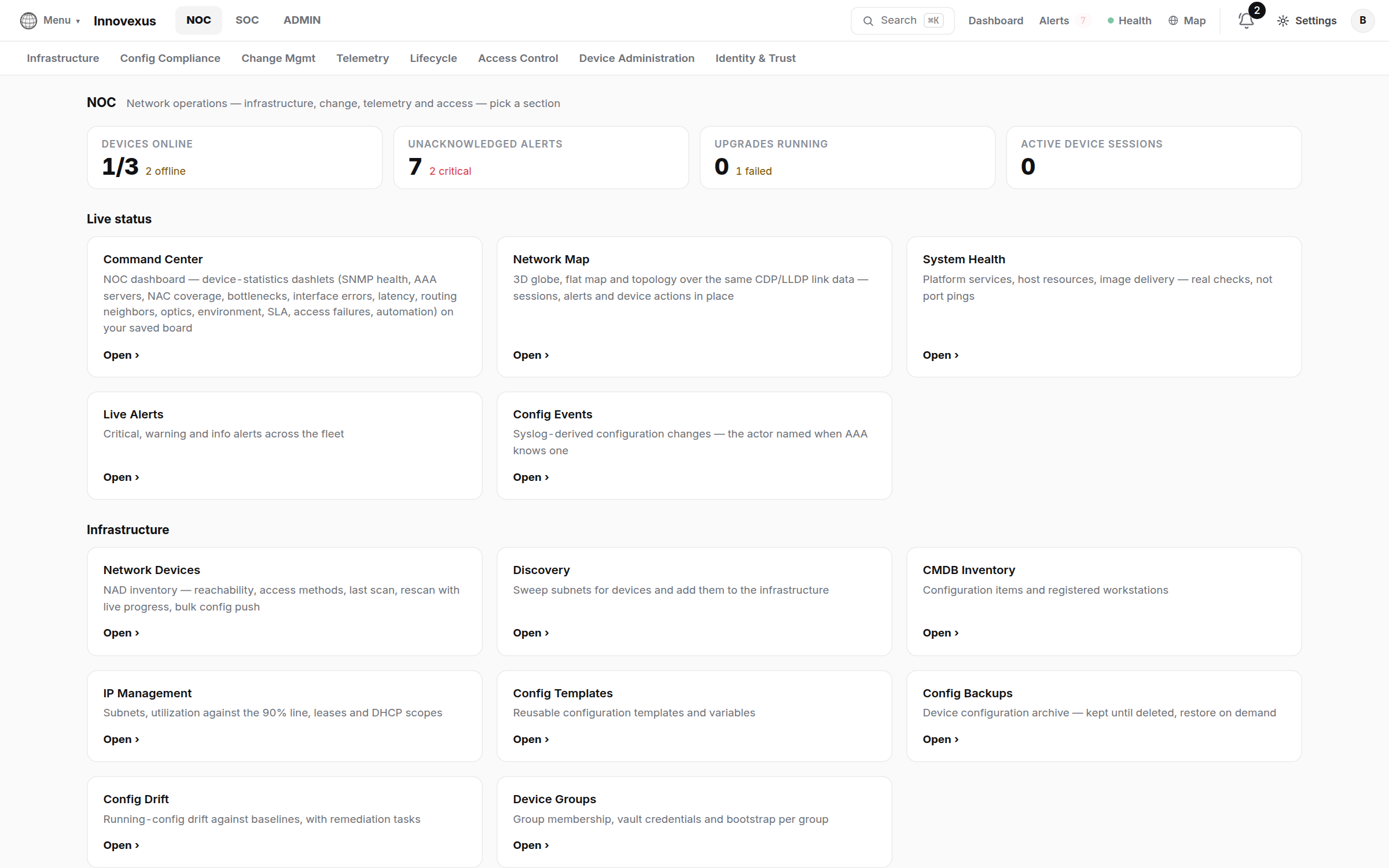
The web console is one application with three workspaces — NOC, SOC and ADMIN. Each workspace is a complete operator view: its own dashboard, its own sections, its own day-to-day work.
The three workspaces
| Workspace | Who lives here | What it covers |
|---|---|---|
| NOC | Network operators | Device inventory and discovery, configuration backups / templates / drift, change management and upgrades, telemetry, the world map, and network access control (802.1X / MAB / TACACS+). Guide → |
| SOC | Security operators | Threat-intelligence feeds, vulnerabilities (CVE / CISA KEV), endpoint security, compliance, live session oversight, device lifecycle. Guide → |
| ADMIN | Platform administrators | Identities and roles, AD / LDAP, 2FA and security keys, PKI trust, the credential vault, the RADIUS / TACACS+ daemons, global settings and updates. Guide → |
Reading the header
Every page keeps the same three-row header, so you always know where you are and can get anywhere in two clicks:
- Row 1 — the workspace bar. The NOC / SOC / ADMIN switcher on
the left; search (
⌘K/Ctrl-K), the Dashboard, Alerts, Health and Map quick links, notifications, Settings and your account menu on the right. - Row 2 — sections. The selected workspace’s areas, e.g. Infrastructure · Config Compliance · Change Mgmt · Telemetry in NOC.
- Row 3 — tabs. The pages inside the selected section.
⌘K searches every
page, device and setting you are allowed to see. If you don’t know which
workspace a page lives in, search for it by name.Who sees which workspace
Workspace access is granted per account in ADMIN → Identity & Access:
- Workspace Roles grants an account one or more of NOC / SOC / ADMIN. An account with a single workspace signs straight into it and never sees the others.
- Admin roles (Super admin, IAM Admin, Vault Admin, NOC Admin…) decide what an account may change inside the ADMIN workspace. Admins holding several duties can narrow the view to one duty at a time with the act-as menu — every act-as change is audited.
- Workspace Access fine-tunes which menu entries an account sees inside a workspace.
One rule has no exception: Global Settings entries are visible to every account. Saving a change is what is permission-gated — a read-only operator can always find a setting and see its current value.
Where to go next
Configure the NOC workspace
Add devices, wire up telemetry, schedule upgrades — with the device-side CLI snippets.
Configure the SOC workspace
Feeds, vulnerabilities, endpoint agents, session oversight and the collectors that feed them.
Configure the Admin workspace
Accounts, roles, MFA, the credential vault and the AAA daemons.